

Chat with Charlie
The chat home is where every conversation with CloudStation starts
Chat is the front door of CloudStation. You talk to Charlie, the orchestrator agent, in plain language — Charlie answers directly, builds and deploys things in your workspace, or hires specialist agents and delegates the work to them. Everything else in the product (deployments, schedules, tasks, files) is reachable from a conversation.
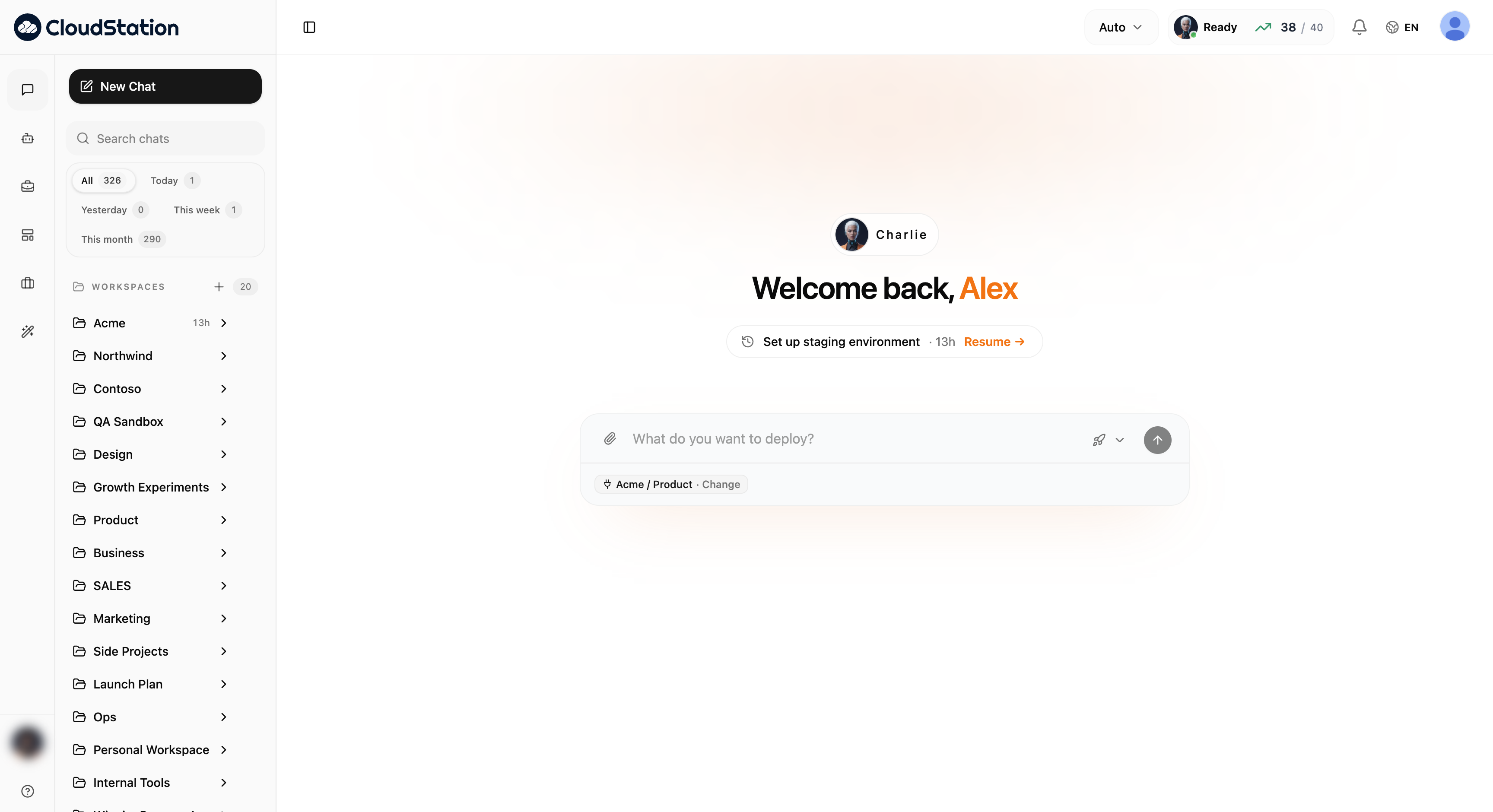
The chat home
Open the app (or click New Chat) and you land on the chat home. It has three areas:
- The composer in the center — type what you want and press Enter. The chip below it shows which workspace and project your message will target. See Composer & targeting.
- The sidebar on the left — search, time filters, and the WORKSPACES tree with all your workspaces, projects, and past sessions. See Workspaces, projects & sessions.
- The top bar on the right — model routing, workspace status, and your usage counter. See Models & routing and Workspace status & usage.
Picking up where you left off
When you come back, the home screen greets you with a Resume pill for your most recent conversation — the thread title, how long ago it was active, and a one-click Resume → that drops you straight back into the thread.
The composer also remembers your last-used project: start typing without picking anything and your message goes to the project you worked in last. In the workspace picker, that project is marked · where you left off.
Starting a conversation
Click New Chat (or just use the composer on the home screen)
Check the target chip below the input — it shows the workspace and project the conversation will use. Click Change to pick a different one.
Type your message and press Enter. Charlie picks it up from there.
You don't need to pre-select agents, models, or tools. Describe the outcome you want — Charlie discovers what's needed, hires helpers if the job calls for it, and reports back in the thread. You can watch every step as tool calls and delegation cards.
Finding past conversations
- Search chats — full-text search over your session titles and messages.
- Time filters — the All / Today / Yesterday / This week / This month chips narrow the list, each with a live count.
- Recent — every thread, grouped by day and week (Today, Yesterday, Earlier this week, Last week, This month, then by month).
- Shared with me — threads teammates shared with you, each labeled with the owner's name. See Thread Sharing.
Where to go next
Composer & targeting
Attachments, the workspace/project chip, and the workspace picker
Inside a conversation
Tool-call cards, delegation, the Agents strip, and the tools panel
Workspaces, projects & sessions
How the sidebar tree is organized and managed
Models & routing
What Auto means and how to pin providers, tiers, and models
Workspace status & usage
The Ready pill, storage, restarts, and the apps counter
Thread Sharing
Give teammates read-only access to a conversation